
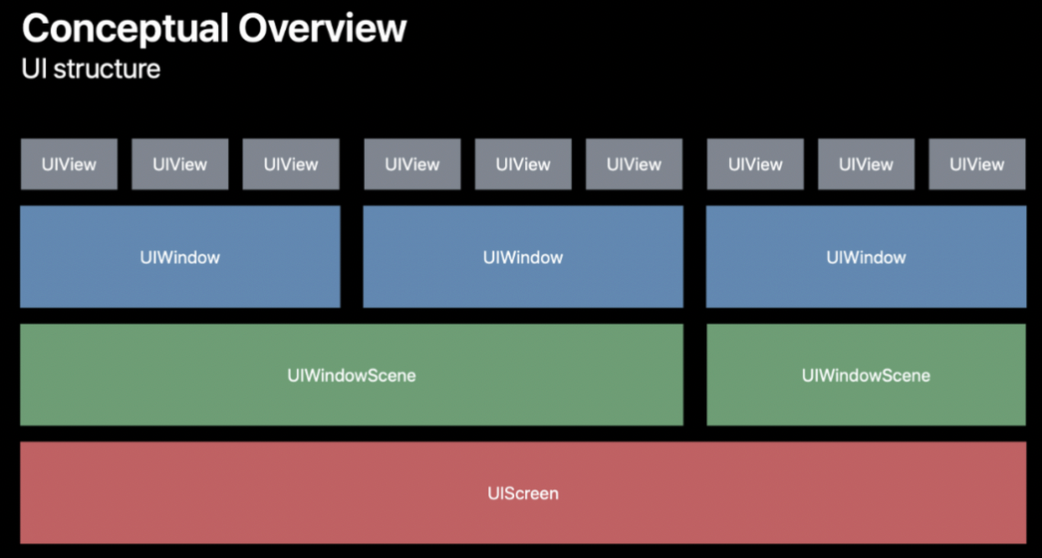
아래부터 차근차근보자
UIScreen

객체로서 하드웨어에 기반한 디스플레이와 관련된 변수를 정의함
오 말 그대로 하드웨어와 관련된 것이다.
UIScreen.main.bounds 로 접근하면 하드웨어 디스플레이 높이와 폭을 알 수 있었던 것이다!
UIWindowScene

Scene인데 window를 관리하는 Scene
func scene(_ scene: UIScene, willConnectTo session: UISceneSession, options connectionOptions: UIScene.ConnectionOptions) {
    // Use this method to optionally configure and attach the UIWindow `window` to the provided UIWindowScene `scene`.
    // If using a storyboard, the `window` property will automatically be initialized and attached to the scene.
    // This delegate does not imply the connecting scene or session are new (see `application:configurationForConnectingSceneSession` instead).
    guard let windowScene = (scene as? UIWindowScene) else { return }
    window = UIWindow(frame: windowScene.coordinateSpace.bounds)
    window?.windowScene = windowScene
    window?.rootViewController = UINavigationController(rootViewController: ViewController())
    window?.makeKeyAndVisible()
}
생각해보면 Storyboard 없는 개발을 할 때 보면 UIScene인데 저기서 넘어오는 변수가 사실 UIWindowScene 였던 것이다.
UIWindow

앱 사용자 인터페이스 배경
뷰에 이벤트를 보내는 객체
오 View 간 이벤트는 그럼 UIWindow 에서 보내주는 건가?
계층을 보면 UIWindow 위에 여러개의 UIView가 올라감을 알 수 있다.

하지만 보면 UIWindow는 UIView를 상속받고 있다.
UIWindow는 UIView에서 특화된 아이라고 보면 될 것 같다!
UIView

사각형 형태의 영역으로 컨텐츠를 관리하는 객체
About the author
안녕하세요🙇🏻♂️ 세상을 더 편리하게 바꾸고 싶은 iOS 개발자 최인호입니다.
Hello 👋 I'm Inho Choi, an iOS developer who wants to change the world more conveniently.
- 대학교 졸업
- Apple Developer Academy @ POSTECH 1기
- KWDC Main Organizer
- AsyncSwift Organizer
Comments
Join the discussionNo comments yet. Be the first to comment.